
🔐 How to Reset Your Password at GAMBITCITY3
Leave Comment/ By E /April 30, 2025
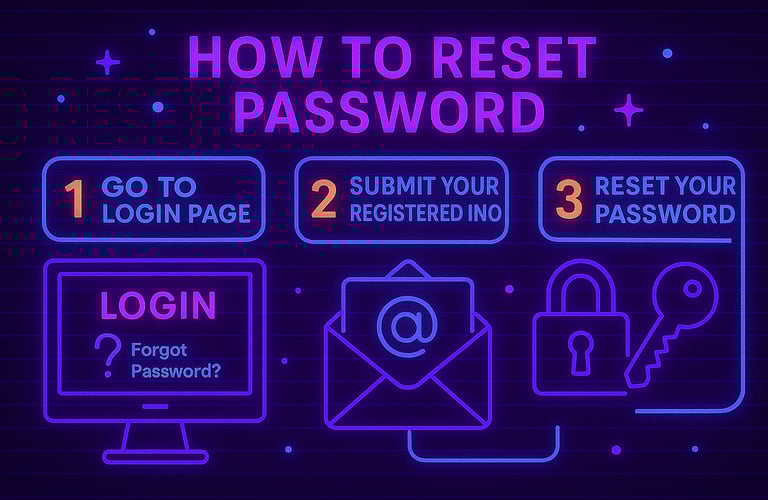
🔁 Step 1: Go to the Login Page
Visit the GAMBITCITY3 homepage and click the “LOGIN” button. On the login screen, click the “Forgot Password?” link located below the password field.
📩 Step 2: Submit Your Registered Info
Enter the email address or username linked to your GAMBITCITY3 account. This ensures your reset request is securely matched to your personal profile.
🔐 Step 3: Check Your Email and Follow the Link
A password reset link will be sent to your registered email. Click the link and follow the on-screen instructions to set your new secure password.
✅ Pro Tip: Use a strong password—mix uppercase, lowercase, numbers, and symbols to enhance your account’s protection.
🎮 Step 4: Log In with Your New Password
Once your new password is set, return to GAMBITCITY3 and log in. You’re now ready to play with peace of mind and full account access.
💬 Need Help?
If you don’t receive your reset email or face any issues during the process, our 24/7 support team is here to help via live chat, email, or phone.
At GAMBITCITY3, your access and security are always a priority—resetting your password is just one way we keep you protected and in control.
Get in touch
Let's Talk
info@gambitcity3.net


ALL RIGHTS RESERVED 2025